What shipped,
newest first.
Brut is a Windows app in private beta. Approved seats get every release by email and download it from the same page they signed in on.
The models: Seedream, FLUX 3, Nano Banana 2.1, Seedance Fast and Mini, Haiku 5.5; Conform extends a picture; layers out of a render; the original back with only the edits
Everything since the 1.1.4 send. Five new models on every seat, three new moves on a picture, the proof sheet judged during the run, clip prompts written for the video model, a generated keyframe on any Storyboard card, Veo's rules on the node, and the fixes of six days of field runs.
- Seedream 5.0 on your BytePlus key. Pro, Flash and Lite in every image menu, on the key you already hold for Seedance: $0.018 a Flash image, $0.045 on Pro ($0.09 at 2K), Lite at $0.035 up to 4K; up to 10 references (14 on Lite), masks as guidance, watermark off. Every Seedream edit node offers Same as the picture (the default on Annotate): the result comes back at the input's own pixels instead of a resampled tier. The rule that matters for films: Seedance accepts a Seedream text-to-image picture with a face in it (a one-picture character sheet included) and the frames of its own clips; every Seedream edit, every crop and every other maker's portrait is refused there. Image → Video on Seedance shows a green line naming the wired pictures that will pass and an amber one naming those that will not; a refusal names the picture and the rule. The Character Lab's note says the same: wire its design alone.
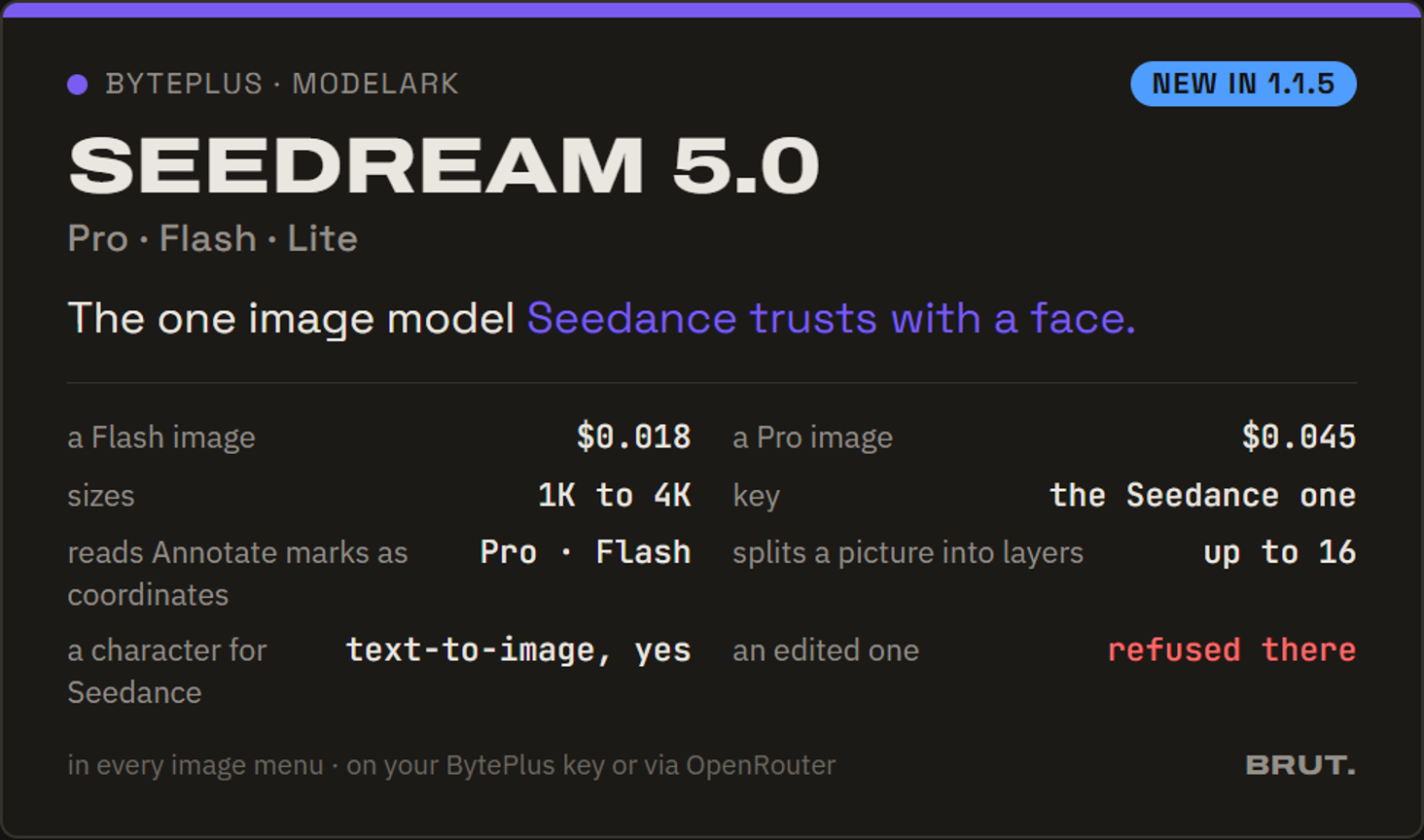
Seedream 5.0: the image model Seedance trusts with a face - Decompose into layers. Right-click any picture → Decompose into layers… (or Decompose result… under a Layers node). One Seedream call (Flash or Pro, size led by Same as the picture, an optional "what to separate") returns a base and up to 16 RGBA layers with names, and Brut lands them as a new Sketchpad beside the source: base at the bottom, the layers in stacking order at their boxes, the original hidden on top for a one-click compare, the names and descriptions on the rows. Export PSD works at once; Find in ledger on the new Sketchpad reaches the paid row. Flash bills $0.018 per layer, base included; the dialog states the ceiling (17 outputs) and what four layers would cost before you pay; every way out spends nothing.
A render split into sky, building and trees, dragged apart in the Sketchpad - Annotate & Correct on Seedream. Pick Seedream Pro or Flash on the node: each edit lands at its mark and the result comes back clean, with nothing of your markup left in it. Moving a mark runs the node again; saving the same marks does not. Seedream Lite stays off this node's menu.
Three marks, Seedream Flash, each edit at its mark, the picture at its own size - Reconcile with input, rebuilt. A generative edit redraws the whole frame: a few pixels of drift everywhere, regenerated texture, a shifted tone. 🗇 Reconcile with input on an Annotate result now spawns the Layers node with the original as the base, lines the result up with it, keeps only what changed near your marks and composites at once: the original's exact pixels everywhere, the model's only where you asked. The Annotate node's own output is never touched; the Layers editor opens on an ordinary mask you can repaint. It works whatever model made the edit.
The wipe shows the drift everywhere; after Reconcile, only the two edits differ - FLUX 3 Image and FLUX Outpaint. Black Forest Labs joins the providers on one key (dashboard.bfl.ai, prepaid credits; ⚙ Settings shows the balance). FLUX 3 Image is in every image menu: 768 px to 4K, up to ten reference pictures, web grounding on by default, from $0.041 an image ($0.10 at 2K), also through OpenRouter. FLUX Outpaint is a painter inside Conform (below), the one that holds the known pixels: $0.10 per megapixel painted in high mode, a fast mode at about a sixth, a size menu (up to 4, 2 or 1 MP), the price shown before the paint.
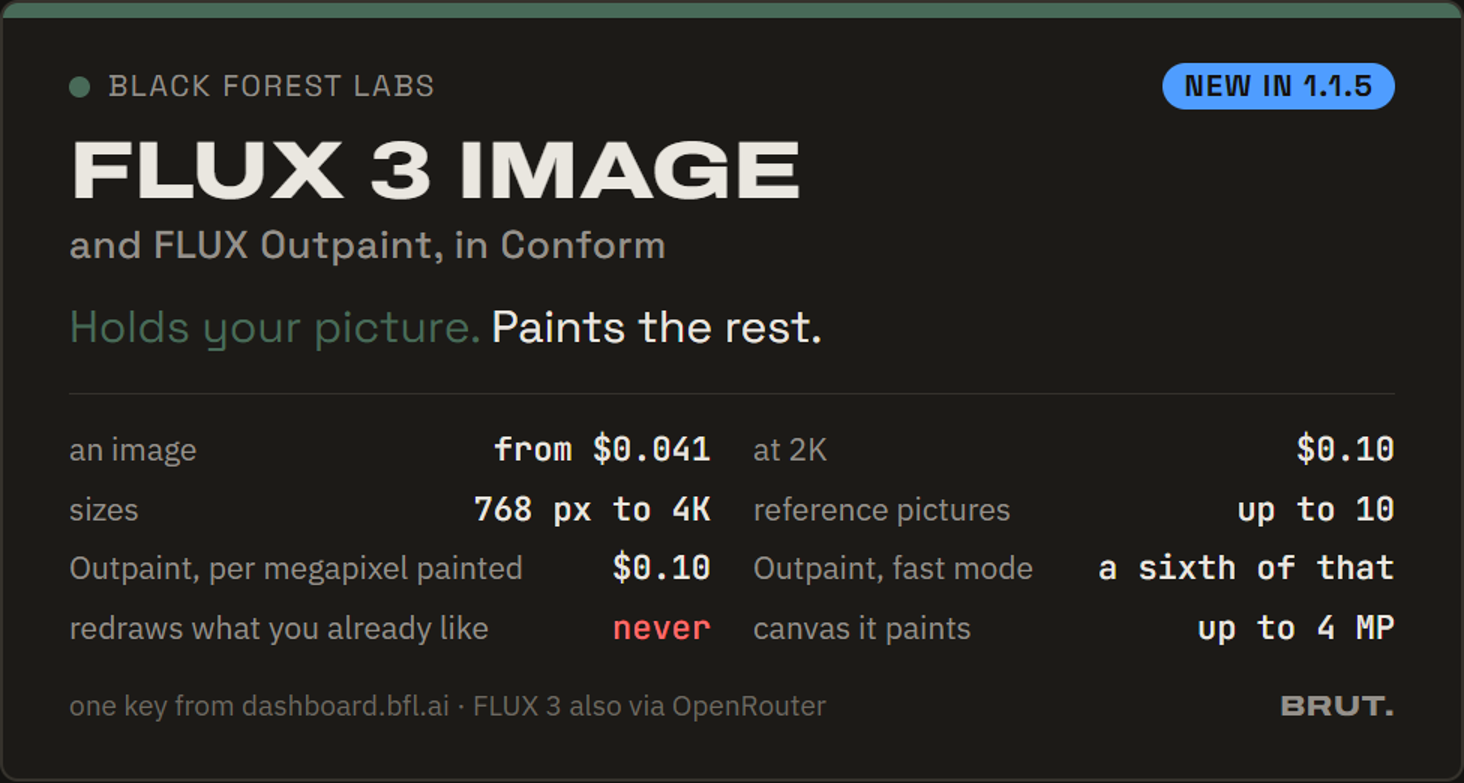
FLUX 3 Image in the menus, FLUX Outpaint in Conform - Conform extends a picture. The Method menu gains extend beside crop (pad stays, free): the ✂ editor places the frame outside the picture (Shift locks the direction, the edges and the center snap), shows the painter bar (provider, model, size led by Same as the picture, GPT quality, the price for this still) and a note per still; ✦ Paint this still paints from the editor, ✦ Paint N stills from the face, ↻ per tile re-paints, 🕘 and 📌 per still keep and pin takes. With FLUX Outpaint the picture is held and only the band is painted, up to 4 MP (a larger frame is painted smaller, never scaled up). With an image model the frame is redrawn from a prompt written for each still automatically; the readout says so. FLUX Outpaint is the default painter on a seat with a Black Forest Labs key, GPT Image 2.5 Flare elsewhere. The node's height follows its tiles.
A lake house grown to 4:3 on FLUX Outpaint: the frame placed above, Paint, the sky painted, the picture untouched - Nano Banana 2.1, and Nano Banana 2 retires. Google's new Flash-tier image model is in every image menu at half Nano Banana 2's price: $0.034 at 1K, $0.05 at 2K, $0.076 at 4K, up to 14 references, thinking on, clean lettering, on your Gemini key or through OpenRouter. Google shuts Nano Banana 2 down on October 29, 2026: Annotate & Correct and the Correction Loop (now v2) start on 2.1, the model's own description on the node says it is retiring, and any node still on Nano Banana 2 needs a new pick before then.
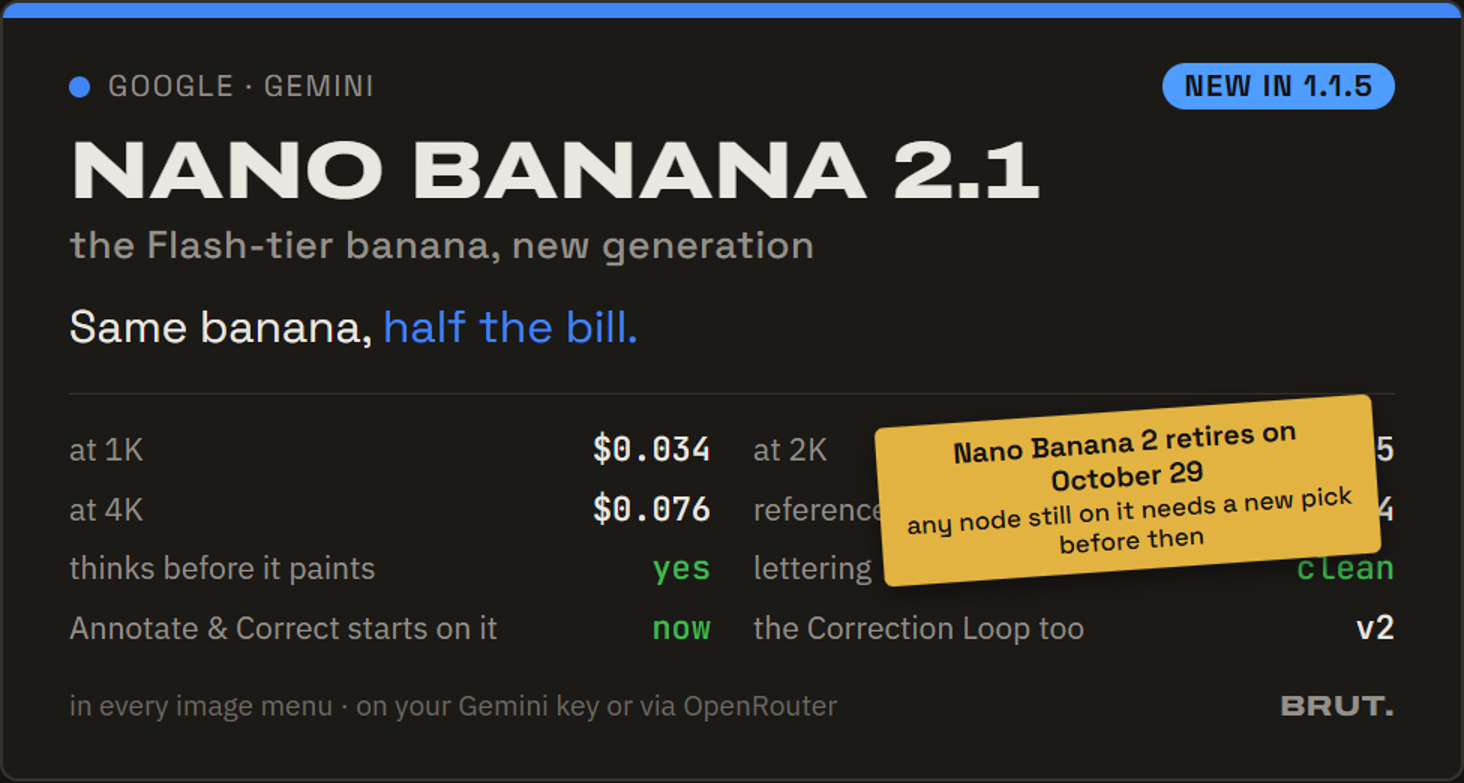
Nano Banana 2.1: same banana, half the bill - Seedance 2.0 Fast and Mini, and the last frame. The two cheap Seedance 2.0 tiers in the video menus: 480p and 720p only, 4 to 15 seconds, first and last frame, nine references, audio; a 4-second 480p take on Mini is about $0.14, on Fast about $0.23 (list rates, native or through OpenRouter). Every Seedance clip now hands back its last frame: ⏭ Last frame → Image In on Image → Video drops it beside the node, ready to start the next shot; it also rides the ledger row. Seedance 2.0's 1080p and 4K stay on the full model.
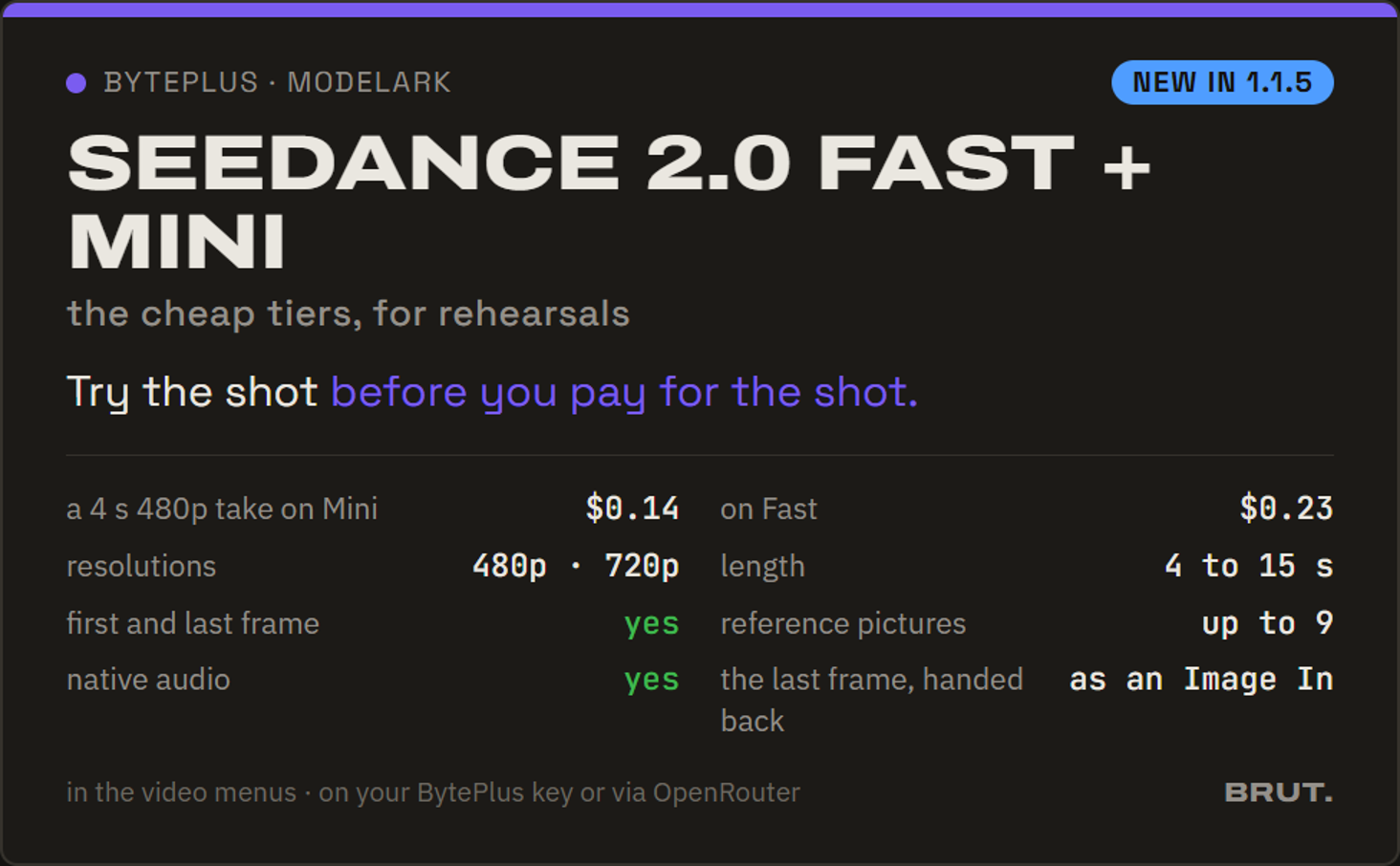
Seedance 2.0 Fast and Mini: try the shot before you pay for the shot - Claude Haiku 5.5. Anthropic's new small model, in every text picker a day after release: $0.10 in, $0.50 out per million tokens, a 1M context, the reasoning dial (low to max) and the thinking switch (adaptive by default, a plain off). Marcel's narrator lane picks it first on an Anthropic key, so recaps and diagnoses cost a tenth of what they did on Haiku 4.5 (still listed). A prompt over 100,000 tokens pays five times the rate, the one current Claude priced by prompt length; Brut's estimates and ledger rows apply it. Also through OpenRouter.
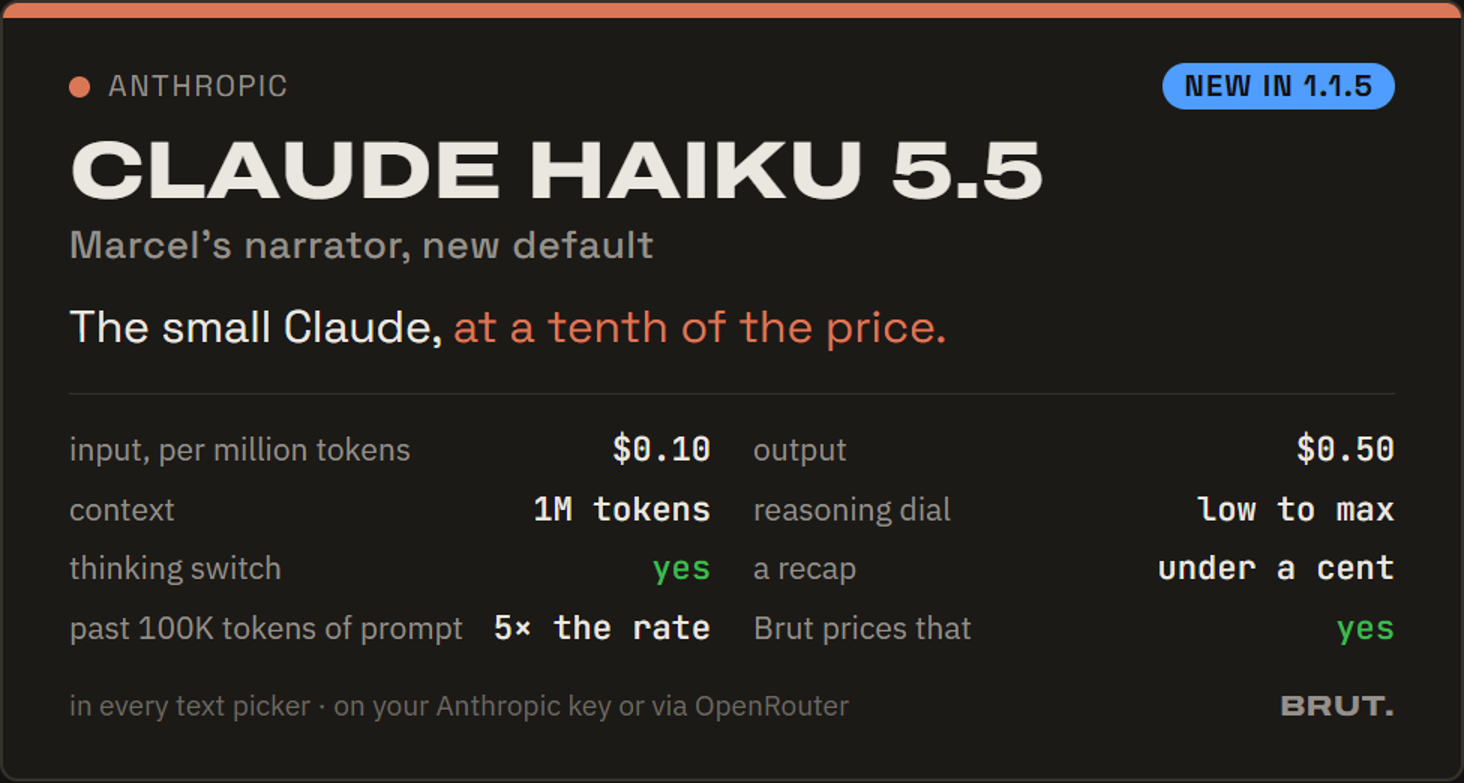
Claude Haiku 5.5: the narrator, at a tenth of the price - GPT-6.1 Sol. OpenAI's new middle tier (released September 29) in every text picker: near-Astra work at $2 in, $10 out per million tokens, a 1M context, the reasoning dial from low to xhigh (default medium). On your own OpenAI key Marcel advises on it; like Astra, it takes function tools only through OpenAI's Responses API, so his acting turns run on it through OpenRouter. GPT-6 Sol stays listed. A prompt over 272,000 tokens pays a higher tier ($4 in, $15 out), which Brut's estimates and ledger rows apply.
- The proof sheet opens during the run. On Stills → Film (and any card holding a Director), the plan's run now renders the contact sheet at once and a review opens over the canvas: Take this sheet (a run whose sheet replays under it goes on without asking), ↻ New take, ✎ Reinvent N after ✗ on frames, or Stop (nothing downstream runs on an unjudged plan). Stills → Film ships as v3: GPT 5.6 Terra plans, the sheet and the keyframes on GPT Image 2.5 Flare at xhigh, clips on Kling 3.0 with audio, the knobs reduced to the Director's dials, the film aspect and one Quality; a 📖 Plan button and a headline on the card. Every grounding image now goes to the planners with its number written in front of it, which ends the anchor off-by-one on long boards.
The Director runs, the proof sheet opens for your call, Take this sheet, the run goes on - Clip prompts written for the model you picked. Film Shots adapts every sent clip's prompt to the video model you picked (Kling, Seedance, Veo, Omni), so each model gets the kind of prompt it follows best. The table shows the rewrite with a ✦, the Director's text stays on hover, a plan edit rewrites that clip, a model switch to another family rewrites them all, the same family replays. A failed rewrite is loud and sends the Director's text. No knob: it is how Film Shots sends.
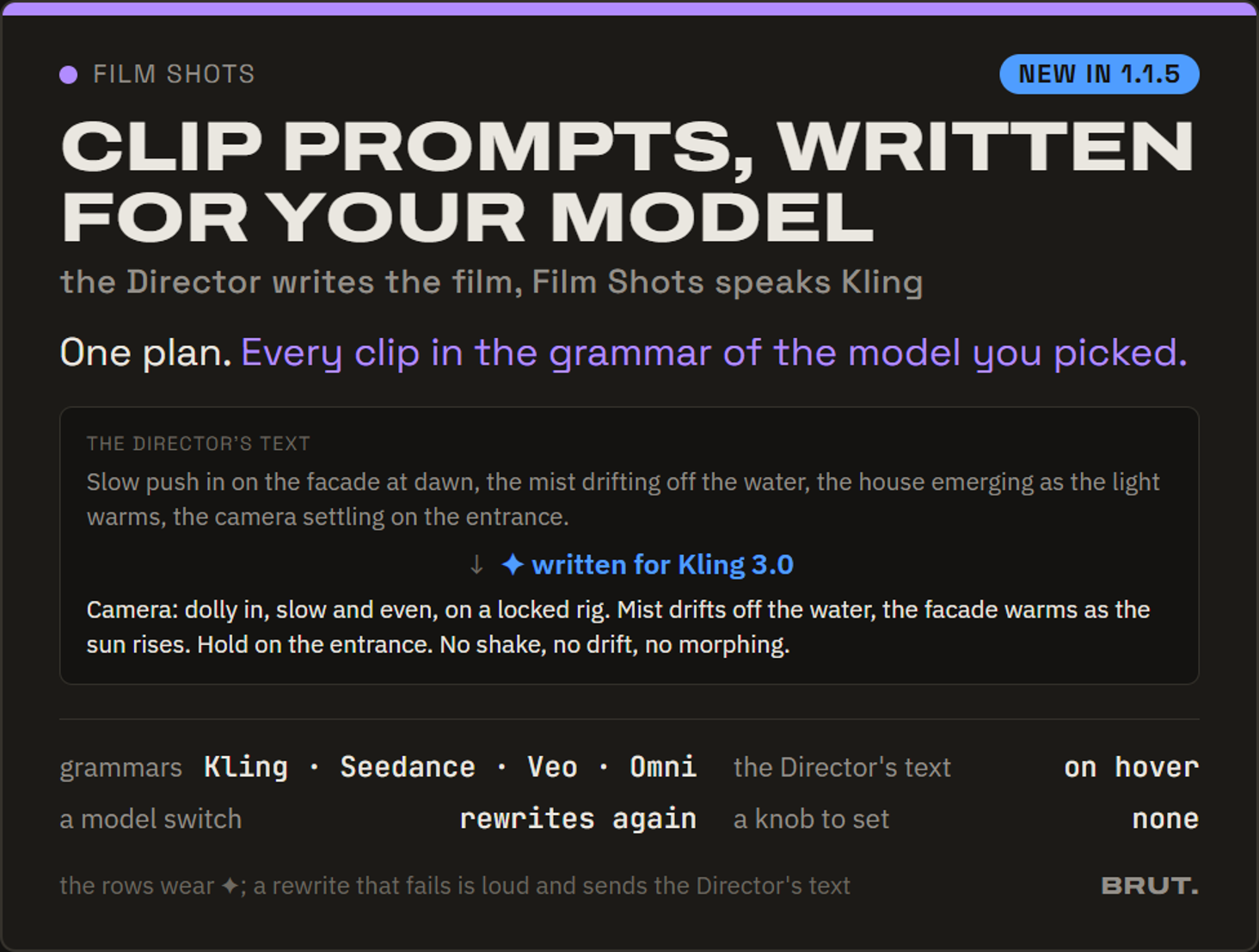
The Director's line, then the same shot written for Kling: one named move, a locked rig, no shake words - Storyboard: 🎨 generate on any card. Every card's start selector offers 🎨 generate beside the stills. An invented shot you grounded on a still by hand comes back to its keyframe; a grounded shot or a shot you added yourself gets a generated keyframe of its own, its prompt and anchor stills written on the card. A card whose prompt is still to write says so and stays blocked downstream, never sent as text-to-video.
An invented shot on 🎨 generate: the keyframe renders on the card; a frame dragged out becomes an Image In - Veo's rules on the node. Google renders 1080p and 4k at 8 seconds only and needs 8 seconds with reference images: Image → Video greys the impossible durations and resolutions in place with the reason, Film Shots snaps the plan's lengths to what the resolution allows, the audio box reads always on (native Veo 3.1 cannot be silenced; the OpenRouter route still can). 4k joins the menus on Veo 3.1 and Fast (no price until a clip runs). Refine gained a Veo preset written in Veo's own vocabulary; the clip workflows' Prompt-style knobs offer it.
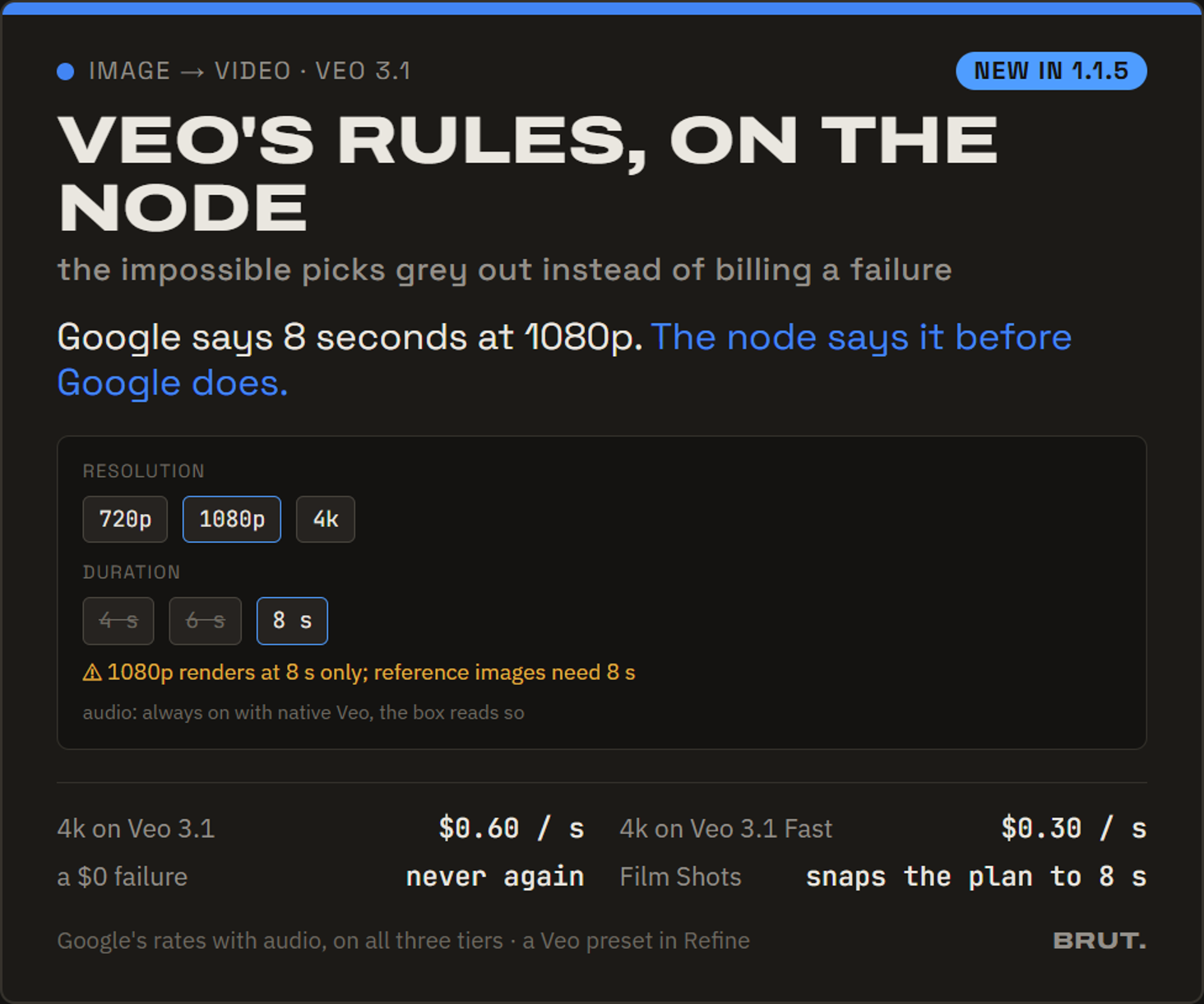
Veo 3.1 at 1080p: 4 s and 6 s greyed with the reason, 8 s open, audio always on - Kling (subscription) without a subscription. A kling.ai plan with no subscription, credits or not, runs one clip at a time and watermarks it. Film Shots now re-queues the clips Kling refuses for running beside another and runs them one by one after the pool, the row saying so on hover, instead of failing four out of five.
- Veo priced as Google bills it. Every native Veo clip carries audio, and Google lists its rates with audio: Veo 3.1 $0.40 a second at 720p and 1080p, $0.60 at 4k; Fast $0.10 / $0.12 / $0.30; Lite $0.05 / $0.08. The catalog now carries those figures (the earlier blocks ran 25 % low on 3.1 and 50 % high on Fast at 720p), and 4k has an estimate instead of a question mark.
- Storyboard: a keyframe prompt in pin. An invented card's plug bar had the keyframe prompt out but no way in; it now has both. Wire a Refine output or a Text Board tile into 🎨 keyframe prompt in and it becomes the generated frame's prompt, a new keyframe. A shot you add with + and leave without a clip prompt no longer vanishes from Film Shots: its row is listed and blocked, naming the fix.
- The proof sheet keeps the film's shape. Ten 16:9 frames used to be laid on a 16:9 sheet, two columns of five, each frame twice as wide as it should be. The sheet's aspect now follows its grid (two by five of 16:9 is a 3:4 sheet; an aspect you set on the bar wins), so every frame reads at the film's proportions.
- The node menu is alphabetical. Tab, and the list a dragged wire offers, list the nodes by name when nothing is typed; typing still ranks the matches.
- Fixes from the field: Marcel re-encodes a picture under 2048 px but over 5 MB before it goes to Claude (Anthropic's cap), so a large PNG no longer fails the turn; the Refine and Multi-Shot planner selects name their real default (Gemini 3.8 Flash); in the Annotate editor, once the marks list grew taller than the picture, the drawing overlay stretched with it and marks were shown and recorded lower than drawn (the request too): the frame now wraps the picture; a slow render past the client's wait says so in words ("the provider did not answer in time", re-roll) instead of a bare ReadTimeout, and the image clients wait longer for a 2K high-quality render; the Reconcile Layers node is wired original-first; Same as the picture keeps a Seedream edit at the input's exact size on Pro and Flash. Docs at getbrut.app/docs gained the Seedream and Black Forest Labs pages, Decompose and Reconcile sections, Conform extend, the Veo rules and Haiku 5.5.
The Workflows: fifteen ready-made cards, a gallery, Save project as, and Marcel sees what you name
Everything since the 1.1.3 send. The library now ships a bank of workflows, each one closed card with knobs on its face and a real before and after, and the library itself became a gallery. Around it: a project move that takes everything along, readable file names, Seedance draft takes, Marcel with eyes on the nodes you name, four new brains, and a long round of fixes from the field.
- Fifteen workflows ship with Brut. Clay → Photoreal, Clay to Client Set, Time of Day (dawn, day, dusk, blue hour, night), Weather & Sky, Populate, Populate → Clip, Scene Dressing, Editorial Sheet, Look Transfer, Hero Still → Clip, Finish in 4K, Stills → Film, Reel Script, Character Lab and the Correction Loop, on four shelves: Architecture, Characters, Cinema, Text. Each drops as one closed card with knobs: a brief, a mode, the model of a stage. The image stages are pinned (Nano Banana Pro at 2K, GPT Image 2 for people); video and upscale stages ship unset, so the provider and its price stay yours, and the card says when a stage still needs a pick. Every card carries a real before → after cut from the workflow's own run on its own scene; Try with sample drops a card already fed with a shipped picture and shows the shipped result until you run it; Next chips under a result drop the workflow that usually follows, wired. A dropped card is frozen at its version and shows a vN in the library chip when a newer one exists; a closed card shows the key one of its stages is missing. Clip cards rest on the still they take and play their clip on hover. Marcel knows the bank: ask for a dusk version of a render and he drops Time of Day with the knob set.
Clay → Photoreal on the lake house: the clay in, the photograph out, dusk after rain from two words in the brief - Knobs on a composite card. Any closed composite can expose inner fields on its face: a prompt variant (the menu word is the label, the whole prompt the value), a text, a number, a tick list, or the model of a stage, route-aware. Flip a knob and only that stage re-renders. The clay cards carry a structured brief (Materials, Vegetation, Time of day, Atmosphere, Anything else; an empty line is the model's call) plus Size and Quality. The clip stage takes Duration, Resolution, Ratio and Audio from the picked video model's own menu, greyed in place where it has none; Prompt style greys the refiners written for another model; Move (eight camera moves), Speed and Steady camera complete it. ⚙ Add knob on any card of yours; Marcel reads and sets knobs by their label.
Time of Day on the hotel street: day, then dusk, one knob - The library is a gallery. The book icon on the rail opens a full surface on the home's mold: From Brut and Yours as paged shelves, search, category chips (Architecture, Characters, Cinema, Text, plus the ones you name), presets grouped by family. Hover a card: the input, then the result. Every card says Add to canvas; a template lands as a group of live nodes named after it. Your own saves keep a before and an after when an image is wired in, and the save dialogs ask for a category from a pick list. The home's Start-from row is now one Workflows row: templates and composites together, the library one tile away.
Scene Dressing on the empty loft: the shell, then the room, nothing re-modelled - Stills → Film, Reel Script and Finish in 4K are cards. The whole film chain as one composite with the Director's dials, the film aspect and the three models as knobs; Finish in 4K is its Next chip (an upscale stage inside a card would fail every run until set). A closed card's inlets now feed everything inside it: the Stills → Film card generates its keyframes and its proof sheet closed, and the keyframe confirm says when no proof sheet exists to follow yet.
- Save project as. Work begun on the default project moves into a project of its own: the canvas, every output it references, the past takes behind the clock, the ledger rows and the named graph file. Shared files stay as copies; nothing is re-rendered, every cache stays warm. The first launch now asks for a project before anything else, so new work never lands on the default one. The same mechanism keeps a
.brutpackor a NAS share warm on another machine: unchanged nodes replay free. (On 1.1.3 the move fell back to carrying the canvas alone; that was the 1.1.3 engine, this build carries the real thing.) - Readable output file names. Every output is named
project_graph_node_provider_MODEL_date_jobinstead of a bare id, uploads are named after their graph, and a name shortens by itself near Windows' path limit instead of failing. Right-click any picture → Find in ledger turns it back into the run that made it (model, node, prompt, cost) and jumps to the node's history; File ▾ → Output file names… sets a pattern of your own per project. Old files keep their names. - Seedance draft takes. On Seedance 2.5, tick Draft take for a 480p clip billed like any 480p clip, then ⬆ Render final re-renders the same take at 1080p from the provider's own draft: same seed, same frames, only the pixels change, within seven days. On Image → Video and on Film Shots (a final tick per row, then Render N finals). The node, the Clip Board and the Sequence follow the final once it exists.
- Marcel sees what you name. Write a node's id in a message and its current pictures go along: a Storyboard's card frames, a Director's proof sheet, a board's pool; the composer says so before you send, and he knows which picture is which. Right-click any picture → Send to chat; the 📎 picker is newest first and holds still; From disk…, paste and drop bring outside images in; up to 50 stills per message on every brain. His replies render bold, lists and quote blocks, so a prompt copied out of one pastes clean, and he never claims to have seen an image he was not sent. The chat stays on the latest line (a scroll parks it, your own message or run brings it back), Ctrl+C copies selected text even with nodes selected, and the right-click on text or a field offers Copy, Cut, Paste and Select all.
- Four new brains, two corrected prices. Claude Sonnet 5.5 is Marcel's default brain (same price as Sonnet 5) and Claude Opus 5.5 joins the pickers (cheaper than Opus 5, thinking always on); GPT-6 Sol and Luna join on the OpenAI key or through OpenRouter, Luna the cheapest text model in Brut, and Marcel on a GPT brain acts from the first message (his tools run at reasoning none, the one setting OpenAI's chat API accepts with tools). Sonnet 5 now prices at its real $2 / $10, and OpenAI estimates count prompt caching; earlier estimates ran off, the bills never did. Refine and the Multi-Shot planner default to Gemini 3.8 Flash. GPT Image 2.5 Flare and Sunburst also run through OpenRouter (aspect plus the full low to max quality menu, about 1K, no masks), GPT Image 2 via OpenRouter takes the aspect ratio, and every OpenRouter image and video route estimates from a measured price.
- Inpaint, round 2. The mask editor paints like the Sketchpad: stamped dabs with pen pressure, Shift+click straight lines, Ctrl+Z and Ctrl+Y inside the editor (with ↶ ↷ buttons), the bracket keys through AltGr. ↳ Inpaint result chains the next pass on the result with its own prompt. And the node tells the truth about masks: on every provider the mask steers the edit and the model redraws the whole image; for pixel-exact results outside the mask, stack the result over the original in Layers.
- Conform crops free and applies itself. free at the bottom of the Aspect menu, then the ✂ editor crops any shape with eight handles and a size readout; the modal fits the image. No ▶ any more: a saved crop lands on the tile at once and re-cuts that still alone, so nothing downstream of the others re-pays. A bad ratio is refused up front.
- Canvas. Press a connected input pin and drag: the wire comes off (drop it on empty canvas to disconnect, on another pin to move it). ⌗ with nodes selected tidies only those, in place, and wired chains lay out as tables, a pool of sources as a compact grid. A small line at the bottom left of every input, image and video node gives the real pixel size, and a clip's length and fps; Compare shows it per pane. Move children under the magnet drags everything upstream with a node. A graph opens fitted to the window. Text → Text's two blocks each have their own resize grip, Image In keeps 🔍 top right and ✕ top left like every node, Preview shows what is wired the moment a graph opens, and node titles wear Brut's display face.
- Nodes. Refine and Text → Text read every wired text in wire order. Image → Image with nothing wired runs as text-to-image on the same model. Image → Video gained follow the input in the aspect menu (the start frame's real ratio, no bands on an odd still) and a Steady camera switch; Compose and multi-image edits on Gemini keep the scene's aspect on auto. OpenAI edits go out trimmed to multiples of 16 (at most 15 pixels, centered), which reduces drift. A Shot Board wired from a composite's port reaches the Multi-Shot inside for ✓ ✗ ↻ 🕘. The Sketchpad has its icon and the node browser says what it really costs: free · $.
- Sign in with a code. The sign-in email carries an 8-digit code beside the link; type it on the sign-in screen when a company mail scanner has already opened the link and used it up. The download page got the same fix live.
- Fixes from the field: an Image → Video fed from a Storyboard card gets its own prompt instead of the whole plan; a Storyboard keyframe no longer stays pending after a pasted prompt; wires stay on a board's plugs when a card changes height; a closed composite glows while a stage inside runs and carries 🕘 and ↻; a chain ending in a Preview still gets its output port; closing a card no longer adds inlets for unwired inputs; Reveal in Explorer finds folders with spaces; Seedance 2.0 offers its real 4 to 15 seconds; a Kling prompt too long for the command line says so before any upload; the Director no longer shows a library brief in place of a legacy custom one, and Marcel can only set it to briefs it has; native Veo 3.1 Fast always carries audio, so a silent request is refused loudly instead of billed; an updated shipped cover shows after an update. Docs at getbrut.app/docs gained a Workflows page generated from the shipped files, a search box, and the sign-in and file-name pages.
A home screen, a History board, and the Sketchpad generates into a selection
Brut now opens on where you left off. Plus a board that shows every take a node ever made, the Layers editor round you asked for, snap to grid, and a round of fixes from the first beta reports.
- The home screen. Brut opens on a home, not a bare canvas: a Continue card with your live graph and its latest results as the cover (hover it to flip through the last five), a What's new panel beside it, then every recent graph across all your projects in a paged gallery, each card badged with its project, its cover cycling through the graph's last results on hover, with a search box and a project filter. Start from lists the templates by type (Images, Video, Text) with the starters on their way marked soon; a Community workflows row is there, marked soon. The house icon on the left rail and File then Home bring it back any time; Esc or Continue returns to the canvas; New graph asks for a name first, so you never land on unsaved work; a checkbox at the bottom turns the launch landing off.
Where you left off, every recent graph, hover a cover to flip through its results - The History board. A board node that shows every past take of the generation nodes wired into it, newest first, one group per node with its model, date and cost, from the project ledger. Videos play in place, a pin on a tile lands on the source node, a tile drags out as an Image In. The answer to "I get lost in my generations".
Every take of the wired node, newest first; pin one and the source node shows it - Sketchpad: generate into a selection. Draw a marquee or the new ellipse (Shift+M cycles them; a late Shift makes a square or a circle, a late Alt grows from the center), press the spark, type what belongs there: the model fills that area of the flattened scene and the selection becomes the layer's mask. No marks needed.
An ellipse on the floor, one prompt, the render lands inside it - The Layers editor round. Per-layer opacity, Ctrl+Z and Ctrl+Y inside the editor, fills that follow the swatch (Alt+Backspace foreground, Ctrl+Backspace background), Ctrl+I to invert a mask, Shift-click straight strokes, the stamped-dab brush from the Sketchpad (no more beading along a curve), and the node composites the moment you press Use this stack, so it never sits un-run.
- Snap to grid, and dots you can see. A magnet on the rail snaps dragged nodes to the canvas dots (a device setting, off by default); the dots themselves are bigger, on a 24-unit pitch, tuned separately for the dark and light themes.
Magnet off, then on: the node lands on the dots 
The canvas grid, dark theme - You will know when a new build is out. At launch, while signed in, Brut compares your version with the latest installer and shows one line under the toolbar with a Download button when you are behind. Nothing new leaves the machine: the answer rides the existing sign-in heartbeat.
- Multi-Shot's broken shot lists are fixed. A planner reply that comes back broken is now rare, and the shot planner retries once before giving up; the cinema planners got the same.
- Fixes from the field: typing mid-text in the Prompt node, the Text Board tiles and the Storyboard card prompts no longer jumps the caret to the end (a 1.1.2 regression, every text field is now under test); a Delete or Backspace inside the Sketchpad or Layers editor can no longer remove the node behind it, and reopening the painter while its images were still loading no longer shows a single layer; Marcel's native Gemini brain acts again (tool calls carry their thought signature back) and Gemini's new refusal spelling gets its plain explanation; the Image to Video aspect select shows again on Seedance 2.5 text-to-video runs; the File menu lost its stray emoji and every item sits on one line; the blank taskbar icon from the early 1.1.2 installers is healed on install.
The Sketchpad: draw over your images, then let the model finish the drawing
The first release after the Budapest conference ships the item you asked for most: a place to compose before you generate. Plus a real right-click menu on every image, wires you can route and color, and OpenAI's new image models.
- The Sketchpad node. A painter inside Brut: brush and eraser with pen pressure, six brush presets, a Photoshop-grammar color panel (foreground and background, HSB field, recent colors), fill bucket, marquee and lasso selections, Shift-click straight strokes, Alt-click eyedropper. Wire your renders in and place them as layers: move, scale, rotate with on-canvas handles, set opacity, paint a mask on any layer, group layers into folders. Undo and redo inside the editor. The flattened image flows out of the node like any other image, and running it costs nothing.
- Generation layers. Paint a few marks where you want something, press ✦, and one paid render lands as a new layer masked to your marks: the scene below stays yours, the model draws what you sketched, and you keep adjusting the layer's mask, opacity and position afterwards. A follow dial (loose, balanced, close) sets how literally the marks are read; a scope switch renders only the marked region on very large documents; every take stays in the layer's history and can be pinned back. Cost is shown before every render.
Paint the marks, press the spark, the render lands as a masked layer - PSD export. Any Sketchpad document exports as a Photoshop file with every layer, mask, folder, name, opacity and color label intact, from the editor footer or the image's right-click menu.
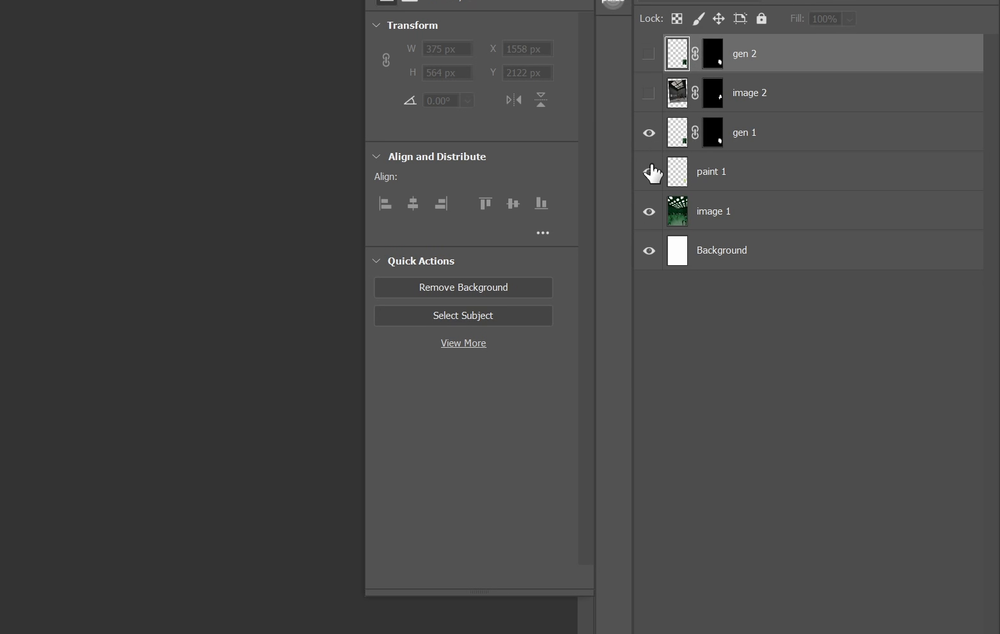
The exported stack open in Photoshop, masks and folders included - The media right-click menu. Right-click any image or video in Brut, outputs and imports alike: Reveal in Explorer, Copy file path, Copy image (a video gives its poster frame), Export JPG (full resolution) and Export web JPG (2048 px), saved into the project's exports folder and revealed at once.
One menu on every image and video - Wires you can shape. Three wire styles per graph (curved, straight, stepped) from the left rail, saved with the graph. Alt-click a wire to drop a reroute dot and route it around things; delete the dot and the wire heals. A wire menu: add reroute, insert node, color, delete.
Alt-click a wire, drag the dot, the wire follows Curved, straight, stepped - Node color and wire tint. Right-click a node: Color, Run, Duplicate, Group, Collapse, Delete. Pick one of six hues and the node and every wire leaving it take it, through reroutes, on every selected node at once. Wires can carry their own color too. Dense graphs finally read at a glance.
A hue on the node, and on everything that leaves it - GPT Image 2.5 Flare and Sunburst. OpenAI's new pair, measured live on forty runs: 2.5 at max quality bills exactly what GPT Image 2 bills at high, and 2.5 at high bills about GPT Image 2's medium, so the same picture costs less or a better one costs the same. Sizing is now always explicit (OpenAI's automatic size used to let the model shrink a 2K inpaint to 1254 px).
- New planners. Gemini 3.8 Flash (Google's strongest Flash, same introductory price as 3.7) and GPT-6 Astra, available but not recommended for Brut's workloads: powerful and expensive, and it acts for Marcel only through OpenRouter for now. Also corrected: Gemini 3.7 Flash estimates had used Google's batch rate, half the real price.
- One OpenRouter key reaches more. New routes for Nano Banana 2 Lite, Seedance 2.5 and Kling O1, so an OpenRouter-only seat runs the starter graph out of the box.
- Sequence keeps your sound and your format. Assembled films keep each clip's audio (silent clips get silence, so mixed pools stay in sync, crossfades blend the sound) and adopt the first clip's aspect: vertical reels no longer ship pillarboxed.
- Run reveals first, then asks. The toolbar's Run no longer generates blindly. Pass one replays every cached, pinned and free step for $0 and marks the nodes whose inputs changed with a needs a run badge (their last result stays on the face); if anything would bill, one dialog itemizes it with the estimate: Generate, or keep the cached state. Every generation node also shows its last result the moment a graph opens, so a reopened graph never looks empty.
- Sketchpad, from the first exe round: the brush size/softness gesture works with a pen (no pointer lock, the Windows press-and-hold ring is harmless), the brush circle previews at the canvas center while a slider is dragged, a readout next to the pressure boxes shows what the last stroke sent (pen · 78 %, or mouse · no pressure when the tablet driver sends mouse events), and images decode fully before the first preview.
- Polish: the inpaint mask editor got the Layers-editor feel (wheel zoom at the cursor, middle-drag pan, a brush cursor, [ and ] to size); Ctrl+C on a node with an image on the clipboard pastes the node again; the per-kind frame colors were dropped for a calmer canvas.
The Director: the whole cinema crew in one call
In hard field testing on a real competition project, the four-agent chain lost a head-to-head against a single well-briefed model, so the planning side of the cinema pipeline was rebuilt around the winner; everything downstream is untouched.
- The Director node. One agent, one call: it analyzes your stills and writes the concept, the look and the executable shot plan, with a real cinematic arc and no two shots alike. Brief and Style menus, People and Audio dials, shots and runtime. Your own brief and style arrive on labeled wires (saveable as Prompt presets): a wired brief composes with the menu and wins on conflict. Every clip carries a one-line ambient sound note for video models that produce audio.
- The proof sheet. Before any keyframe money, render the whole film as one numbered contact sheet, about twenty cents. Select the shots that don't inspire you and hit Reinvent: one planning call rewrites just those, every kept clip stays untouched to the byte. Re-render, loop, then pin the sheet you validate: a pinned sheet survives plan edits and new takes, and every past sheet stays in its history.
- Sheet-directed keyframes. The validated proof sheet rides into every invented-shot keyframe render as the composition and grade reference: what you approved is what gets produced, and a re-rolled sheet honestly invalidates unpinned keyframes. Field-proven combo: GPT Image 2 for the proof, Nano Banana Pro at 2K for the frames.
- New takes, board-wide. One button on the Storyboard re-rolls every generated keyframe at once (after a model switch, or when none of them sing), behind one itemized confirm. Pinned, wired and grounded cards are kept; old takes stay in each card's history.
- Production dials. An Advanced panel on the Director: camera (RED, ARRI, Sony Venice, Blackmagic, IMAX, 35mm and 16mm film), lenses, lighting, composition, subject emphasis and movement energy, each a locked instruction the plan must obey.
- Four new looks join the style library: Mediterranean Sun, Overcast Delicate, Mysterious Reveal, Ecstatic Life.
- The Cinema Director template replaces Cinema Crew in the library: ten nodes from stills to a 4K cut, preset to the proven combo, video provider left to you. The four-agent crew (Scenarist, Artistic Director, DoP, Script Supervisor) is now legacy: hidden from the node browser, but every existing graph keeps loading and running exactly as before.
- Polish: crew plan faces read as documents (the film's title, Review and Re-plan up front, raw JSON behind a toggle), collapsible node sections, and a day's worth of field fixes.
Two new video models, a review desk, and a character lab
Everything since 1.0.9, in one installer. The largest video update Brut has had.
- Seedance 2.5 (BytePlus): clips from 4 to 30 seconds, up to 30 reference images addressed by name in the prompt, first and last frame, 1080p. Frame runs follow the start frame's aspect; a start frame with references switches to the keyframe-reference mode the provider requires. Seedance 2.0 stays in the menu for 4K. Both generations keep their own Refine presets.
- Gemini Omni Flash: 3 to 10 second clips with sound, on the Gemini key you already have. Billing is flat per clip, about a dollar whatever the length, so the default asks for 10 seconds. Both models live in Image → Video and Film Shots.
- Generated end frames on the Storyboard. Any card can generate its end keyframe: the crew's embedded writer drafts the prompt from the clip's start frame plus the reference stills it picks from your board, and you edit it before anything is billed. Every prompt a card owns (clip, keyframe, end frame) has its own plug.
- Mute and tick boxes. ✕ on a Storyboard card mutes it: it stays on the board, greyed, and comes back with one click. Film Shots rows carry tick boxes, so you send exactly the clips you mean to pay for; the Σ row is the master box.
- Review, on every crew node. The Scenarist, Artistic Director, DoP and Supervisor documents open as documents: headline, prose, style bible, shot cards. Edit any field in place, leave margin notes on a section or a shot, and Revise applies your notes in one planning call, on the node's own model. Invented cards have an anchors editor, and a plan that counted the stills from 1 instead of 0 heals itself.
- Storyboard keyframe history. Every past take of a card's keyframe is browsable (the 🕘 button) and re-pinnable, conformed to the film's current aspect for free.
- Multi-Shot V2. The planner used to reach for the same props on every set. Now each run draws a hand of cards from a scenario's deck (a Surprise dial: Classic, Fresh, Crazy), you can redraw the hand or pick cards yourself, and a studio memory of recent motifs keeps the next set from repeating the last one. The planner model is selectable per node, with its reasoning dial. Climate scenarios are retired: climate is a card now, not a scenario. The node's height follows its content.
- Character Lab, the first built-in composite: wire a character image in, get an expression grid, a full-body studio portrait and an orthographic turnaround sheet out. The character presets anchor identity to the wired image instead of re-describing it in words. Closed composites show their results on the card.
- Compare node: any two wires, side by side, one click into the wipe slider. ↻ re-roll on every generation node takes another shot without touching the cache; the previous take stays in history.
- The canvas. One resize language everywhere: a ghost corner grip on hover, no more frames. Conform is a board (2 to 5 per row). Drag an image off any node's preview straight onto the canvas or into an Image Input. The wheel zooms over boards that don't overflow. Box-select catches wires. Marcel places new nodes next to what they connect to, never buried under existing work.
- Refine gains a model select (Gemini 3.7 Flash by default). The Kling prompt preset keeps to your words and honors the energy you asked for.
- Catalog: Gemini 3.7 Flash and Claude Opus 5 in the planning roster, GPT-5.6 price cuts applied, GPT Image 2 native prices measured and pinned per size and quality (no more "$?" on the 4K tiers).
- Fixes from the field: a dropped connection now reads as a network error with the recovery spelled out instead of a blank
ReadError; planner replies that arrive slightly malformed are repaired instead of failing; crew-node selects no longer overflow the card; Scenarist shot counts display truthfully; a board wired from a closed composite displays its images.
Draw on the canvas
The canvas became a studio wall, and organizing a big graph stopped being a chore.
- Sticky notes, stamps, pen and text. Notes with light markdown, four fonts and five colors (Marcel reads them as context). Emoji stamps for the keeper and the work-in-progress. A pen that honors Wacom pressure and smooths strokes. Text labels for titling regions. All free, all local, all saved with the graph.
- The ring menu. Right-click empty canvas: every organize tool under your hand, and the center flips it to your most-used nodes and recent stamps. Press, drag onto a slice, release.
- Groups with identity: six frame colors, labels readable zoomed all the way out, and a frame adopts any node dropped inside it. Zoom out for real: big canvases fit on screen. Node search is ranked ("fil" finds Film Shots first).
- Right-click any image or clip → Reveal in Explorer. Outputs belong to the project that was active when they were generated; this is how you find them.
- Higgsfield routes: 24 job types wired from an authenticated recon of the real parameter sets, so the subscription route falls back cleanly when a native key is missing. Routed video nodes now hide the knobs a route doesn't declare instead of dying on them.
Point at things and say what changes
Two new nodes that work the way clients already brief you: markup on a picture.
- Annotate & Correct. Draw arrows, boxes, circles, lassos and numbered points on an image, write what changes at each mark, attach a RAL color chip (all 216 classic colors, or eyedrop one from the image) or a reference image per mark. One run applies every marked edit. Live-verified on Nano Banana 2, Pro and GPT Image 2.
- Layers. Photoshop-style masked compositing, local and free: stack a generation over your original, paint the mask (soft brush, opacity, pen pressure, the shortcuts your hands know) and keep every untouched pixel of the source. Generative "nothing else changed" is approximate; Layers makes it exact.
- The correction loop. "Correct result" annotates a result in one click; "Reconcile with input" paints the original back where a generation overshot.
- Per-project budget caps: a soft or hard dollar limit, live spend in the toolbar, the line on every paid confirm.
- Settings, redesigned: provider cards in three tabs, each with an on/off switch. Flip a native key off and your aggregator routes take over.
- Marcel's taste interview, re-runnable any time, with clickable style chips; Claude 5 reasoning and thinking dials on both his voices.
- Nano Banana 2 Lite replaces the legacy banana for text-to-image (about $0.034 per render); new Gemini planning models, faster default at the same price.
- One lightbox everywhere: the magnifier pages any node's whole image set with the arrow keys, and the Clip Board plays your film in it.
- Beta fixes: keyframes on routed keys, Multi-Shot custom notes, savable prompt presets, Log out buttons for Kling and Higgsfield, modals that survive a stray click, oversized images on OpenRouter, and no more blank error messages.
The whole studio on a single key
- One OpenRouter key now runs almost all of Brut: images (the Nano Banana family with real size and aspect menus), video (Kling 3.0, Veo 3.1 incl. Fast and Lite, Seedance 2.0, end frames included), every planning model, and Marcel. A working studio in about two minutes, for those who want simplicity over the last cent.
- Native keys stay first class: cheapest per generation, every knob, and they take over automatically the moment you add them.
- Routing is never silent. Routed nodes show a "runs via …" chip, and OpenRouter runs record the exact billed amount on the ledger, not an estimate.
- Inpaint on aggregator keys for the Nano Banana models; GPT Image 2 via fal and Replicate with each backend's honest size menu.
- New guide: which setup fits you.
Upscalers and routes
- Upscale Image: Magnific (Creative, Precision V2) and Topaz Labs (Gigapixel and generative models), with savable presets, a live cost estimate, batch upscaling, and a before/after wipe with wheel-zoom in the magnifier.
- Upscale Video: Topaz Proteus, Rhea and Gaia-CG in the cloud with an itemized confirm before any spend, HD/4K/8K targets, audio kept. And Topaz Video AI, local: if the desktop app is installed, upscales run on your own GPU, free, and the clip never leaves the machine.
- Routes: a model with no native key can run through an aggregator you subscribe to (fal, Higgsfield, Replicate, OpenRouter for text). Native first, always; the route is flagged on the node and on every ledger line.
- The Cinema Crew template ends in a finish-in-4K tail.
Invented shots
- The cinema crew can invent. A shot no longer has to be grounded in one of your stills: the Scenarist may invent it, the Storyboard generates its keyframe (per card, pinnable, re-rollable), and one clip animates one keyframe. Stills are reused with discipline, never twice in a row.
- The film's aspect ratio is a dropdown on the Storyboard; switching it re-conforms every keyframe for free.
- The activity rail: tools and panels moved to the canvas's left edge, with a categorized node browser (search, hover cards, drag to place) and a new icon set on every node.
- Text → Text node: a free-form ask to any planning model, editable answer, re-askable.
- Node clipboard (copy, paste, duplicate with wires), Marcel's prompt cache kept warm for an hour between turns.
Kling subscription from a bare install
- Two buttons set up the Kling (subscription) provider: Install Kling CLI fetches Kling's official client (a one-time ~1 MB download from the npm registry, integrity-checked) and Log in to Kling opens the browser sign-in. No Node, no terminal.
- The same setup card lives in the onboarding wizard and in Settings; validation errors are visible instead of a dead button.
The first installer
- One .exe. Per-user install, no admin rights, engine and runtime bundled. A tray icon shows engine status; the engine log lives in
%LOCALAPPDATA%\Brut\logs. - Beta delivery: approved seats get an email and download from getbrut.app/download after signing in.
- Marcel, complete: chat grounded in your project's timeline, acting on the canvas (every paid action stops at an itemized confirm), ambient narration behind a four-level Assist slider, a taste profile he proposes and you approve.
- Spend ledger panel, unread badge on Marcel, hosted sign-in with a 30-day offline grace so the app never bricks without a connection.
Brut ran from source inside the studio for months before the first installer: the node canvas, Gemini and OpenAI images, Kling video, input-hash caching, projects and the ledger, composites and the library, Multi-Shot and the Shot Board, inpaint, the cinema crew (Scenarist, Artistic Director, DoP, Script Supervisor), the Storyboard, Film Shots and the Sequence node. Countless experiments on real jobs led us to want to share it with the industry.