Marcel, the companion
Every studio has that colleague who's seen everything — knows which film your lighting reference is from, which tool does the job cheapest, and what you tried last Tuesday. In Brut, that colleague is Marcel (named after Marcel Breuer — Bauhaus, brutalism, the Brut lineage).
His panel is open when the app starts, showing the conversation view (the Raw events toggle adds every technical event); the Marcel button on the left rail (the pulse icon) hides and shows it. The panel is two things at once:
The studio timeline
A chronological diary of everything that happens in the project — runs, results, planner reasoning, errors, and your conversations. It's saved with the project (a file inside the project folder), so it survives restarts and travels with a NAS share or a folder export. On a shared project, everyone writes to the same diary, and entries are tagged with who was signed in.
A long diary stays comfortable: the panel opens at the newest message and follows the conversation as it streams; scroll up to read history and it stops following (a ⤓ Latest button brings you back). Only the newest stretch renders by default — ⋯ Show earlier unfolds the rest in place. And the 🔎 search at the top of the panel searches the whole diary — every chat, plan, and failure back to the project's first day, not just what's on screen — with dated results.
The chat
Type at the bottom of the panel and Marcel answers — streamed live, in whatever language you write. Enter sends, Shift+Enter starts a new line, and the box grows with your message. The whole panel resizes too — drag its left edge to make Marcel as wide as you like (double-click the edge to reset). He knows Brut inside out: every model in the catalog with its real price, every node and how its ports wire, and the whole of this documentation. Ask him things like:
- "Which model should I use for a photoreal archviz still, and what does it cost?"
- "What's the cheapest way to get a 5-second clip?"
- "How do I route one shot from a Multi-Shot into Image → Video?"
He recommends only from the catalog — if a price isn't known, he says so instead of guessing, so "which model for this job?" gets a grounded answer, not a vibe.
The artistic advisor
Marcel is a seasoned artistic director, not just a manual. Ask him for direction and he answers with concrete, citable references — named photographers, films, DPs, architects, eras — never "make it more cinematic."
He carries a style library: a curated set of named looks across photography (Stoller, Shulman, Binet…), archviz conventions (the MIR mood, the clay model, the dusk money shot…), cinema (Deakins nights, Villeneuve scale, Kubrick symmetry…) and current trends — each with a description, ready-to-use prompt language, and which models render it well. Ask "give me three directions for this facade" and he'll cite them by name, with the prompt fragments to try. It's yours to shape: ask Marcel to add or change a look, rewrite one, drop what you disagree with, add the studio's own.
Show him your work. Four ways, all landing on the same message:
- Name the node. Write a node's id in your message, as its title bar shows it (
storyboard-101,image_input-96,director-12), and its current stills go along: a render's result, a Reference Board's pool in board order, a Multi-Shot's curated set, every card frame of a Storyboard, a Director's proof sheet. Before you send, a line under the composer says what Marcel will also see ("👁 Marcel will also see storyboard-101 (8 card frames)"), and the message ends with a short bracketed line telling him which image is which. A named node brings at most 16 stills on its own; the line says when it cut. - Right-click any picture → Send to chat. The image joins your next message and Marcel's panel opens on it. It works on every preview: outputs, imports, board tiles, the magnifier.
- The 📎 button lists every still on your canvas, newest first: the most recent result sits on top and the order holds still while you work. Storyboards list their generated keyframes, a Director its proof sheet.
- From outside Brut: From disk… at the top of the 📎 list, or paste an image into the message box, or drop a file (or a picture dragged out of a node) onto the panel. The file is imported into the project like any image you bring in; no node is needed.
Ask "what would you change about the light?" — Marcel actually looks at it. A few practical notes:
His replies are formatted. Bold, lists, headings and quote blocks render as such in the chat, so a prompt you copy out of a reply comes out as clean text, ready to paste into a node.
Marcel acts — building and running the graph
Marcel doesn't just advise; ask him to do it and he works on your actual canvas:
"Give me a 6-shot dusk study of this render."
He'll place the nodes, wire them, set the prompts and parameters, and offer to run it — you watch each step land on the canvas as he narrates. His toolkit is the same as yours: add, wire, rewire, edit, delete nodes, drop in a saved library composite (yes, the whole Cinema Team) and set its knobs by name, read any node's output, search the project diary, and run nodes.
Three rules keep this comfortable:
- One Ctrl+Z undoes the whole turn. Everything Marcel does in one reply — however many nodes and wires — collapses into a single undo step. Don't like the construction? One keystroke removes it all (and undoing a delete brings a node back with its results).
- Paid work always asks first. Free actions (building, wiring, editing) apply immediately. But before anything would bill one of your keys, you get an itemized confirm — which nodes, which models, the catalog price per step — and nothing is generated until you click. Declining costs nothing and Marcel takes it in stride. Film Shots keeps its own per-clip confirm on top.
- What ran is what's ledgered. Marcel's runs work exactly like yours — unchanged steps replay free, same history, same ledger rows.
He can also save a style: when a look you've been chasing together deserves a name, he'll offer to add it to the style library — only with your go-ahead, and only citing models that exist in the catalog.
How present? The Assist slider
Marcel can also speak unprompted — and how much is entirely your call. The slider at the top of the panel has four levels; each one adds exactly one behavior to the previous, so you always know what you've turned on (and what it can cost):
| Level | What Marcel does |
|---|---|
| Off | Nothing. The timeline stays a passive journal; Marcel never calls a model on his own — not even the quiet taste passes. |
| Reactive | Answers when spoken to, and diagnoses failures: when a run errors, one short remark names the likely cause and the fix to try first. He knows Brut's classic traps on sight — Gemini quietly refusing a picture (usually because of an input image), an error on your first call that means billing isn't switched on, replies cut short. |
| Narrator | + run commentary (a sentence or two when a run that actually generated something finishes — free replays stay silent, and re-running an already-generated graph is exactly that) and a recap when you open a project: where things stood, what finished or failed while you were away, what's still running. If nothing happened since the last recap, he doesn't spend the call at all. |
| Partner | + unsolicited 💡 suggestions — an artistic direction, a model swap (always with real catalog prices), a next step — appearing as small cards in the timeline. |
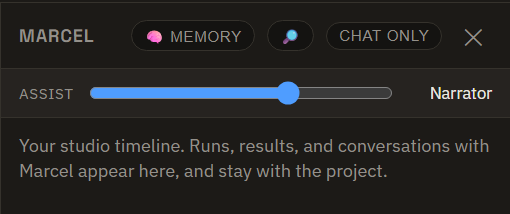
Memory — Marcel learns your taste
Marcel keeps two plain-text memory documents, both stored on your disk and both yours to read and edit (the 🧠 Memory button in the panel):
- A taste profile — tied to your account and shared across every project. What you make, references you love, looks you avoid, the palette and light you keep reaching for. It's private, never synced anywhere, and hand-edits are respected on Marcel's very next reply.
- Project notes — a small memory for this project: what it is, decisions made, where it's heading. It travels with the project (a NAS share or a folder export), so the studio's context follows the work.
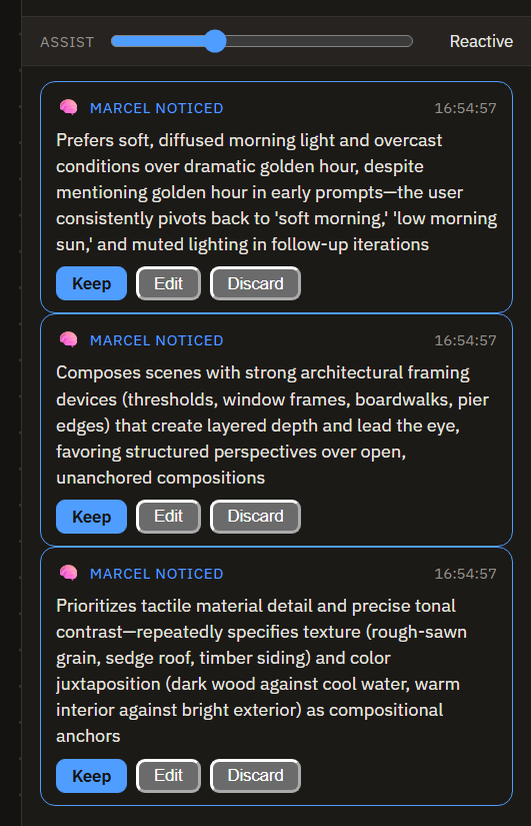
He builds the profile as you work. In quiet moments — when you switch projects — Marcel runs a cheap pass over your recent prompts, re-rolls, and rejections and proposes a note or two: "Noticed you keep re-rolling golden-hour skies → prefers cool, overcast light." Each proposal appears in the timeline as a card you rule on — Keep (folds it into your profile, and you can Edit the wording first) or Discard. Nothing is locked in without your say-so; until you rule, it's treated as a working hypothesis.
Then, instead of filing your answers raw, Marcel can distill them: one call on his brain lane reads what you wrote and proposes back a structured profile in his own words — palette, light, mood, composition, references, hard NOs — "here's what I think you like — correct me." The proposal appears in an editable box; fix anything that's off, then Accept to make it your taste profile (or Redo for another read, or go back and answer more). Prefer no model call at all? Save without distilling files your raw answers exactly as before. The distillation is ledgered like every Marcel call — a few cents on a flagship model.
The interview is never one-shot: relaunch it any time from Marcel's memory (🧠 → Redo the taste interview) or ⚙ Settings → Marcel. Re-running pre-selects the chips that match your current profile, and nothing is overwritten until you accept the new proposal — the rest of your profile (learned notes, hand edits) stays untouched.
Bring your own brain
Marcel runs on your own text-model key, like everything else in Brut — there is no Brut server in the conversation. Add a Gemini, OpenAI or Anthropic key and chat works; without one, the panel remains a fully working journal and the composer shows a quiet add a key link.
One OpenRouter key also works. If you hold no native text key but have an OpenRouter key, Marcel's lanes route through it — chat, ambient narration, acting, everything — visibly (the composer shows ⇄ runs via OpenRouter), at pass-through token rates, so long conversations stay as cheap as on a direct key. A native key added later takes over automatically.
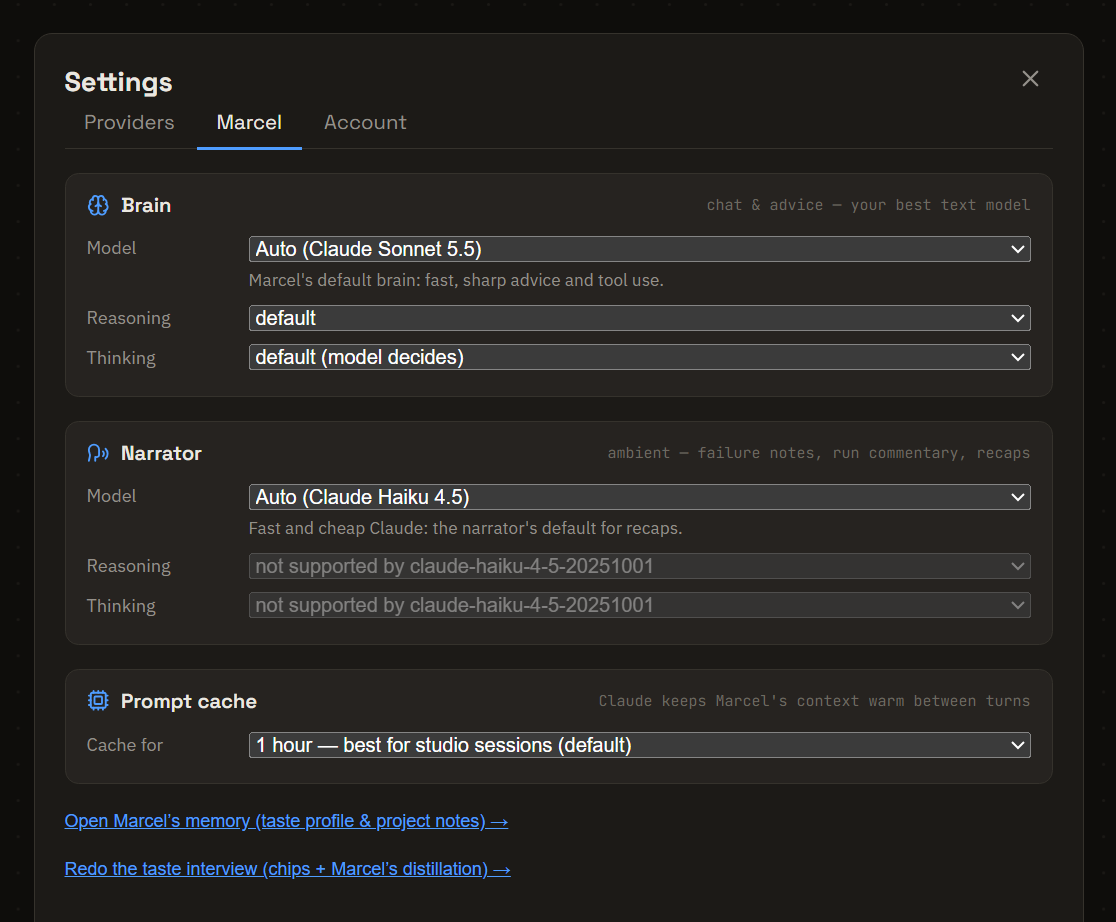
Two model lanes, both pickable in ⚙ Settings → Marcel:
- Brain — the model behind chat and advice. Auto picks your best configured model (Claude Sonnet 5.5 when an Anthropic key exists). Every model in the picker shows its list price (in / out, per million tokens) and, once picked, one line on why you'd choose it.
- Narrator — the cheap lane behind everything ambient: failure diagnoses, run commentary, session recaps, and the quiet taste passes. Auto picks Claude Haiku 5.5 or Gemini Flash, whichever key exists.
Both lanes carry a Reasoning dial and a Thinking switch under their pickers, for full control over speed and cost on each lane. Reasoning sets how hard the model thinks before answering: deeper costs more. It works on the GPT-5.6 and GPT-6 models and on Claude Sonnet 5.5 / Sonnet 5 / Opus 4.8 / Opus 5 / Opus 5.5; on a model without it the row shows not supported rather than hiding. On a direct OpenAI key the brain lane's Reasoning is fixed at none, so that Marcel can act on the canvas (the row says so; the narrator lane keeps its dial). GPT-6 Astra and GPT-6.1 Sol can advise but can't act on a direct OpenAI key for now; through OpenRouter they can. The Thinking switch is for Claude: off is faster and cheaper when you don't need deep deliberation (on Sonnet 5.5, off means no thinking before acting). Opus 5.5 has no switch (its thinking is always on), so its cheap setting is a low Reasoning. Details on the OpenAI and Anthropic pages. Every call's ledger row records the settings it ran with.
Every Marcel call is ledgered like a generation: provider, model, exact token counts reported by the provider, and a dollar estimate from the catalog's per-token prices. Click the spend readout in the toolbar to open the full ledger — per-lane totals up top, then every call newest-first, Marcel's rows tagged with what kind of turn they were.
Real numbers from a measured full-day session (your ledger will show yours):
- Ambient remarks (failure diagnoses, run commentary, recaps, taste passes) run on the cheap narrator lane and cost well under a cent each — measured ≈0.1¢ for a diagnosis, ≈0.7¢ for a recap on Claude Haiku 4.5; Haiku 5.5, the lane's default, bills a tenth of that rate.
- Chat carries everything Marcel knows, about Brut and about you, so it costs more than a remark. On a flagship model that would cost about 19¢ per message, so Marcel keeps the conversation's setup ready (on Claude models): the first message of a session costs more, and the ones after it cost cents, scaling mostly with how long his reply is. The ledger shows what each call cost, so the saving is something you can check, not a promise.
- By default the setup stays ready for 1 hour, even while you work on the canvas between chats: chat, render for twenty minutes, chat again, and the second message is still cheap. The first message of a session costs about 36¢ on Sonnet at list, then the following ones cost cents. If you chat in one rapid uninterrupted stretch, switch ⚙ Settings → Marcel → Prompt cache to 5 minutes: the first message costs less (about 23¢), but any pause longer than that starts over. Studio events that land between messages (runs finishing, errors) add only a small amount, never the whole setup again.
- Cheap-lane chat (Gemini Flash, GPT-5.4 Mini) stays in the 1–2¢ range per turn.
- Brut estimates at each provider's list price, and every ledger row prices from the tokens the provider actually reports. Claude Sonnet 5.5 and Sonnet 5 both list at $2 / $10 per million tokens.
When Marcel acts, one reply may take several model rounds (think → act → look at the result → continue). Each round is its own ledger row, so an acting turn costs a few text calls rather than one — still cents; the generations he triggers are the real spend, and those sit behind the confirm.
Privacy
The conversation goes from your machine straight to your chosen text provider on your key, and the diary, your taste profile, and project notes never leave your disk — see Privacy. Your taste profile is per-account and private; it is never included in an export or synced anywhere. When exporting, a checkbox controls whether the journal travels: on by default for folder exports (backups), off by default for .brutpack handoffs. Project notes travel with the project either way.