Topaz Labs
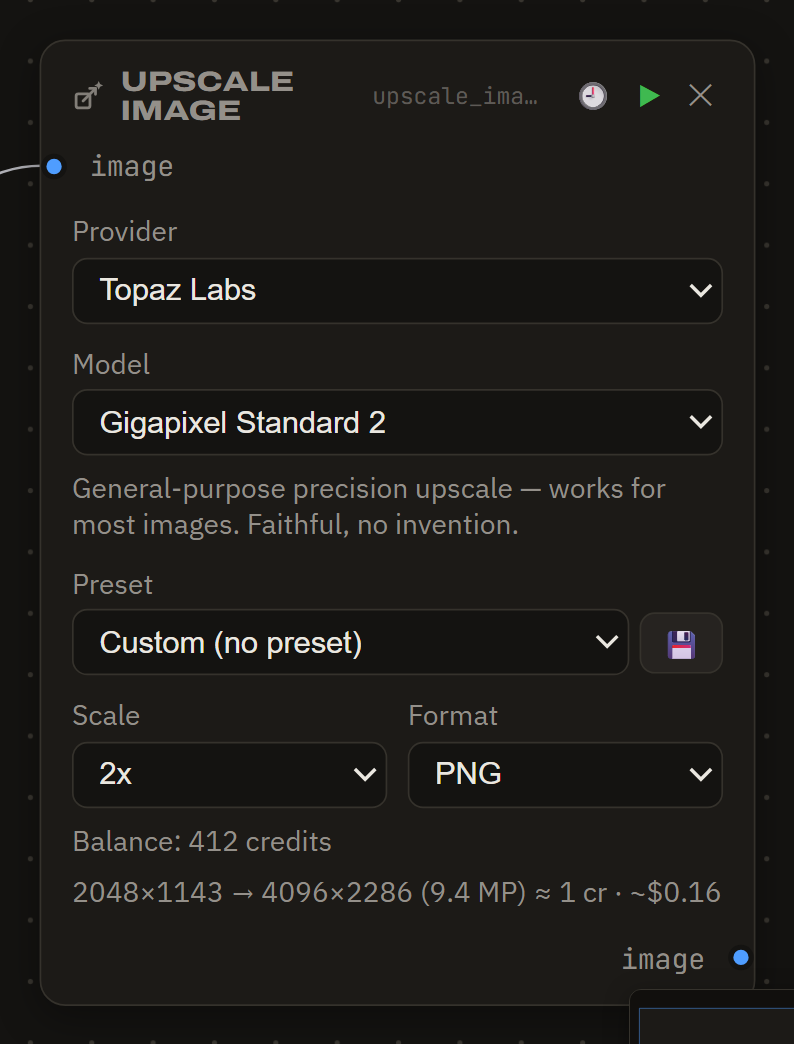
Topaz Labs powers the precision side of the Upscale Image node — the Gigapixel-class faithful upscalers (including a model tuned for renders and CGI) and the Wonder-class generative ones — plus the Upscale Video node (Proteus / Rhea / Gaia CG, audio kept, itemized confirm before any spend). One key covers both.
There are two ways to run Topaz video upscales in Brut:
- Topaz Labs (cloud) — the API below. Credits per job, works on any machine.
- Topaz Video AI (local) — if you own the Topaz Video desktop app and a capable GPU, Brut drives the app's own engine on your machine instead. No key, no credits, no cost per run — and the clip never leaves your computer. See local install below.
Get a key
Create an API key on the Topaz developer portal and paste it into ⚙ Settings → Topaz Labs.
Models in Brut
| Model | Class | When |
|---|---|---|
| Gigapixel Standard 2 | precision | the everyday default |
| Gigapixel High Fidelity 2 | precision | maximum source preservation |
| Gigapixel Art & CGI | precision | archviz renders, illustrations, game assets |
| Gigapixel Low Resolution 2 | precision | tiny sources, thumbnails |
| Redefine | generative | photoreal invented detail, prompt + creativity dial |
| Standard MAX | generative | true-to-input generative restoration |
| Recover 3 | generative | damaged / heavily compressed sources |
Generative models cap input around 24–256 MP and cost more per pixel; the node stops with a clear message if your input × scale exceeds a model's cap — it never downscales your work silently.
Billing — credits
Topaz bills credits by output megapixel: the standard class covers ~24 MP per credit, the generative class ~4 MP per credit, minimum one credit per job. Credits come from one-off packs or a subscription's monthly allowance — the per-credit price depends on how you buy (packs run roughly $0.195 down to $0.158 per credit; subscriptions less).
Brut shows a pre-run estimate in credits (with an approximate $ at a representative rate), the node displays your live credit balance, and the spend ledger records the actual credits Topaz reports for each job. Your Topaz account page is the billing truth.
- An upscale in progress survives a restart of Brut.
- Results are saved to your project right away.
- Provider errors surface verbatim on the node; "not enough credits" says exactly that.
Topaz Video AI (local)
If Topaz Video (or the older Topaz Video AI) is installed and licensed on your machine, the Upscale Video node offers a second provider: Topaz Video AI (local). It runs the same models — Proteus, Rhea, Gaia CG — through the app's own engine on your GPU.
- No key and no account — Brut auto-detects the install (⚙ Settings shows "installed · free"); your app license covers it. If you install it mid-session, hit Check install.
- Free — no credits, no confirm dialog; the ledger records the run at $0.
- Private — the clip is processed entirely on your machine; nothing is uploaded.
- Missing model weights download automatically on first use (a one-time pause per model).
- Output is HEVC (H.265) with the clip's audio kept, like the cloud path.
- One run at a time — a second local upscale queues behind the first (one GPU).
- Closing Brut stops a local upscale (nothing was billed; run it again).
If Brut doesn't find your install, contact us.