Kling (subscription)
The same Kling models, billed to your kling.ai subscription plan instead of API credit packs — measured at roughly 3× cheaper than the REST API, with no 30-day pack expiry. This is the recommended way to run Kling for steady studio work.
How it's authenticated (no key to paste)
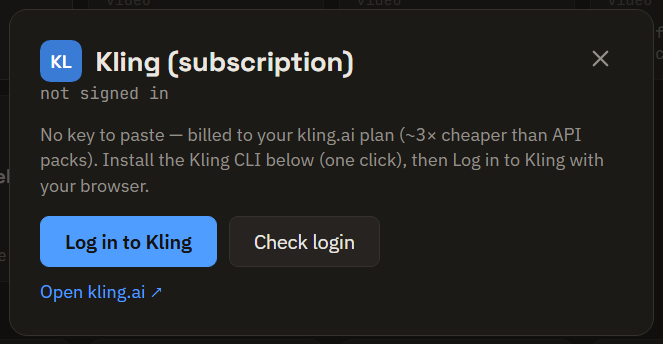
There's no API key here. You sign in with a browser sign-in through Kling's official tool, and setup is two buttons on the ⚙ Settings → Kling (subscription) card (or in the setup wizard):
- Install Kling CLI — one click. Brut downloads Kling's official tool (about 1 MB). Nothing else to install, no admin rights.
- Log in to Kling — your browser opens on kling.ai; sign in there. Your sign-in stays with Kling's tool on your machine; Brut never stores it.
- Check login confirms the session any time, and Log out (shown while signed in) drops it — switch accounts by logging out, then logging back in with the other one. Finished generations stay on disk.
Models
Kling 2.5 to 3.0, including Omni, Turbo and O1; image-to-video and text-to-video.
- End frame (tail image): v2.5, v2.6 and 3.0. The omni family (o1, 3.0 Omni) and 3.0 Turbo have no end-frame input.
- Reference images: o1 and 3.0 Omni take up to 6 extra references besides the start frame — the Image → Video node grows a references inlet when you pick them.
Pricing & your plan balance
Only v2.5 currently carries a measured price (15 credits / 5s / 720p, ~3× cheaper than API list). Other tiers show no estimate until measured — Brut never invents a price it hasn't confirmed.
When this provider is selected on an Image → Video or Film Shots node, the node shows your live plan balance ("🎟 Plan balance: 5,786 credits · Pro") — refreshed after every run — and Film Shots repeats it in the paid-run confirmation, so you always know where your credits stand before and after a batch.
No Kling sign-in? The menu still works
If you pick a Kling (subscription) model without the Kling sign-in, Brut falls back to an aggregator you do hold: Kling 3.0 and O1 route through your OpenRouter key, visibly marked ⇄ runs via … on the node (the provider and model pickers say so before you pick). (O1 via OpenRouter takes 5 or 10 s at 720p, no reference images.) Models OpenRouter doesn't carry (2.5, 2.6, 3.0 Omni, 3.0 Turbo) say exactly that: they need the Kling sign-in or the REST key.
Limits
- Up to 5 requests per second, Personal workspace only, and tasks can't be cancelled provider-side.
- A plan without a subscription runs one clip at a time (even with credits on it: kling.ai treats it as a trial, and the clip carries a watermark). On Film Shots, the clips Kling refuses for running beside another wait and run after the others, one by one, and their row says so on hover. Subscribe on kling.ai for parallel clips and the watermark-free master.
- Sign in once on each computer.
For higher throughput or Team workspaces, use the REST API instead.